BugBench
Static analysis, auto-fix refactoring, and JUnit test scaffolding for Java and Kotlin, designed for VS Code and Kiro — with a bundled MCP server so Kiro's agent can call BugBench directly.
All products → JVM developer tooling

Static analysis, auto-fix refactoring, and JUnit test scaffolding for Java and Kotlin, designed for VS Code and Kiro. Powered by a JVM language server, with an MCP server bundled alongside so Kiro's agent can call BugBench's tools directly during reasoning.
Features
In-editor analysis
- 90+ custom rules on top of PMD 7.5 and SpotBugs.
- Diagnostics in the gutter as you open or save Java/Kotlin files.
- Severity-aware mapping (Blocker / Critical / Major / Minor / Info) surfaced through VS Code's standard Problems panel.
Auto-fix refactoring
- Lightbulb code actions on every auto-fixable issue. ~22 fixers cover try-with-resources, empty catch blocks, unused imports, cognitive complexity, magic numbers, optional misuse, Spring lifecycle, REST controller hardening, Camel route bugs, and more.
- One-shot CodeRef-style workspace refactor:
BugBench: Apply auto-fixes to current file.
Test scaffolding
- Code-lens above every Java class: ▸ Generate tests with BugBench.
- Produces JUnit 5 + Mockito scaffolds with Spring/Camel/REST awareness — recognises
@Service,@RestController,RouteBuilder,Processor, etc., and tailors the generated test to each class type. - Save-to-convention flow: writes the new test under the
src/test/javamirror of the source's package or, if the file already exists, opens a side-by-side diff.
Workspace report
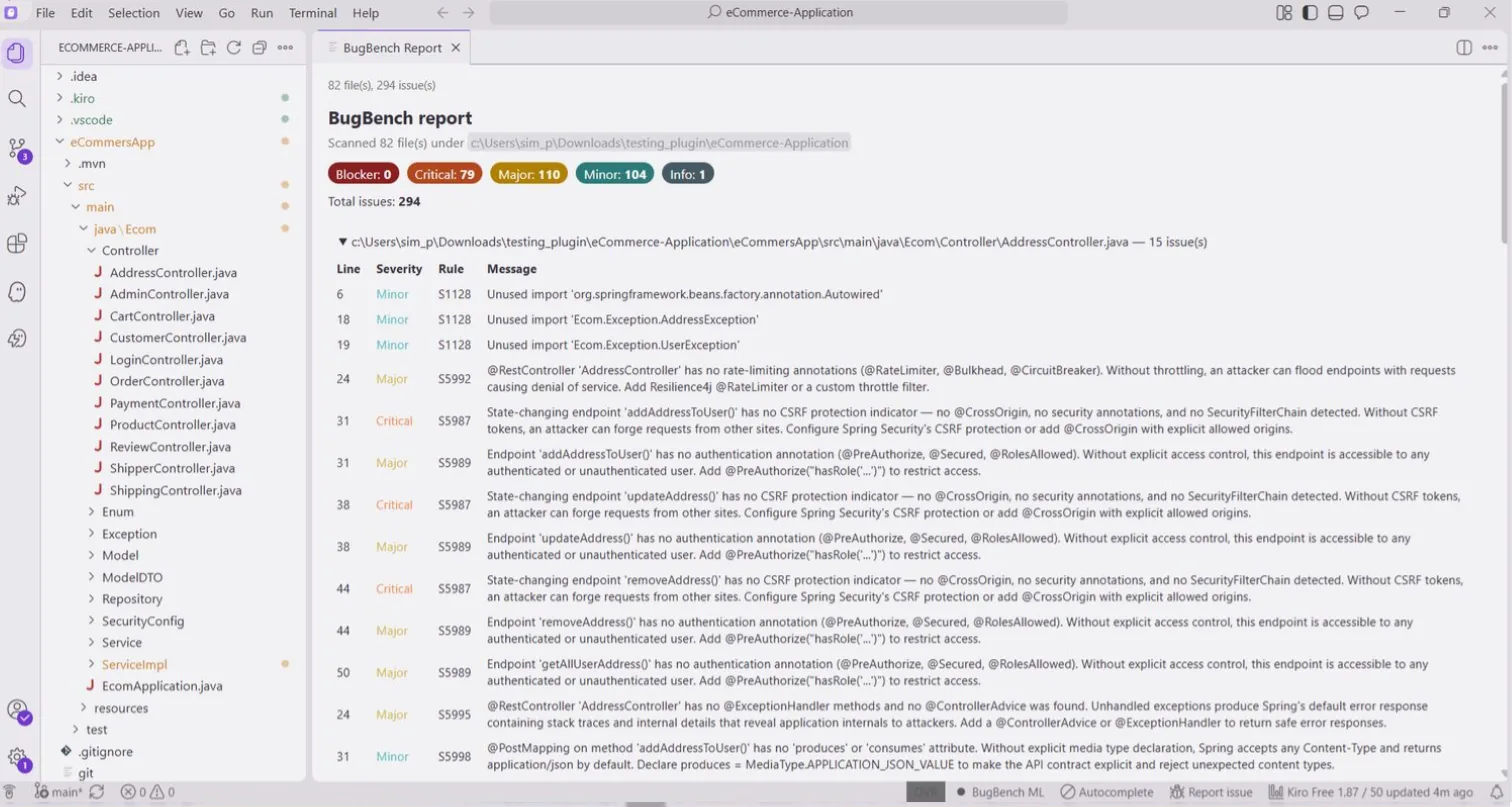
BugBench: Scan workspace and open reportwalks the entire project, runs analysis on every source, and renders an interactive HTML report inside a VS Code/Kiro webview. Severity pills, per-file expandable issue tables, theme-aware colours.
Agent integration via MCP
- Bundles a Model Context Protocol server. On Kiro, BugBench auto-registers itself at user level and prompts once per workspace to register at workspace level (Kiro requires the workspace-level entry for the agent to see the tools).
- Tools the agent can invoke:
getJavaContext,findSymbol,listIssues,listAvailableRefactors,applyRefactor,previewRefactor,generateTests. Mutating tools are dry-run by default — the agent must passconfirm=truefor any file to change. Path arguments are validated against the workspace root. - The same MCP server jar can be plugged into Cursor, Claude Desktop, or Claude Code via the
BugBench: Install MCP server for current host (copy JSON snippet)command.
Requirements
- JDK 17 or newer on PATH or in
JAVA_HOME(or setbugbench.javaHomein settings). The extension refuses to run on older JDKs and surfaces a notification with a one-click "Download JDK 21" action. - VS Code 1.85+ or any Kiro version that ships at or above that engine.
- Real filesystem (refactor and test-gen require it). Virtual / remote workspaces have limited support.
Quick start
- Install the extension from the Marketplace (or from a
.vsixviaExtensions: Install from VSIX...). - Open a Java/Kotlin project.
- Wait ~3 s for diagnostics to appear in the gutter and the Problems panel.
- (Kiro only) When prompted, click Register here on the workspace-level MCP registration banner, then fully restart Kiro. Verify by asking the agent: "Use getJavaContext on this workspace."
Screenshots